A graphical front-end for Portage on Gentoo Linux. Searching for and installing packages, USE flags with an explanation of what each one does, masks and licences, overlays, and the full system update cycle.
Every change to /etc/portage is previewed before it is written. The interface never runs as root.
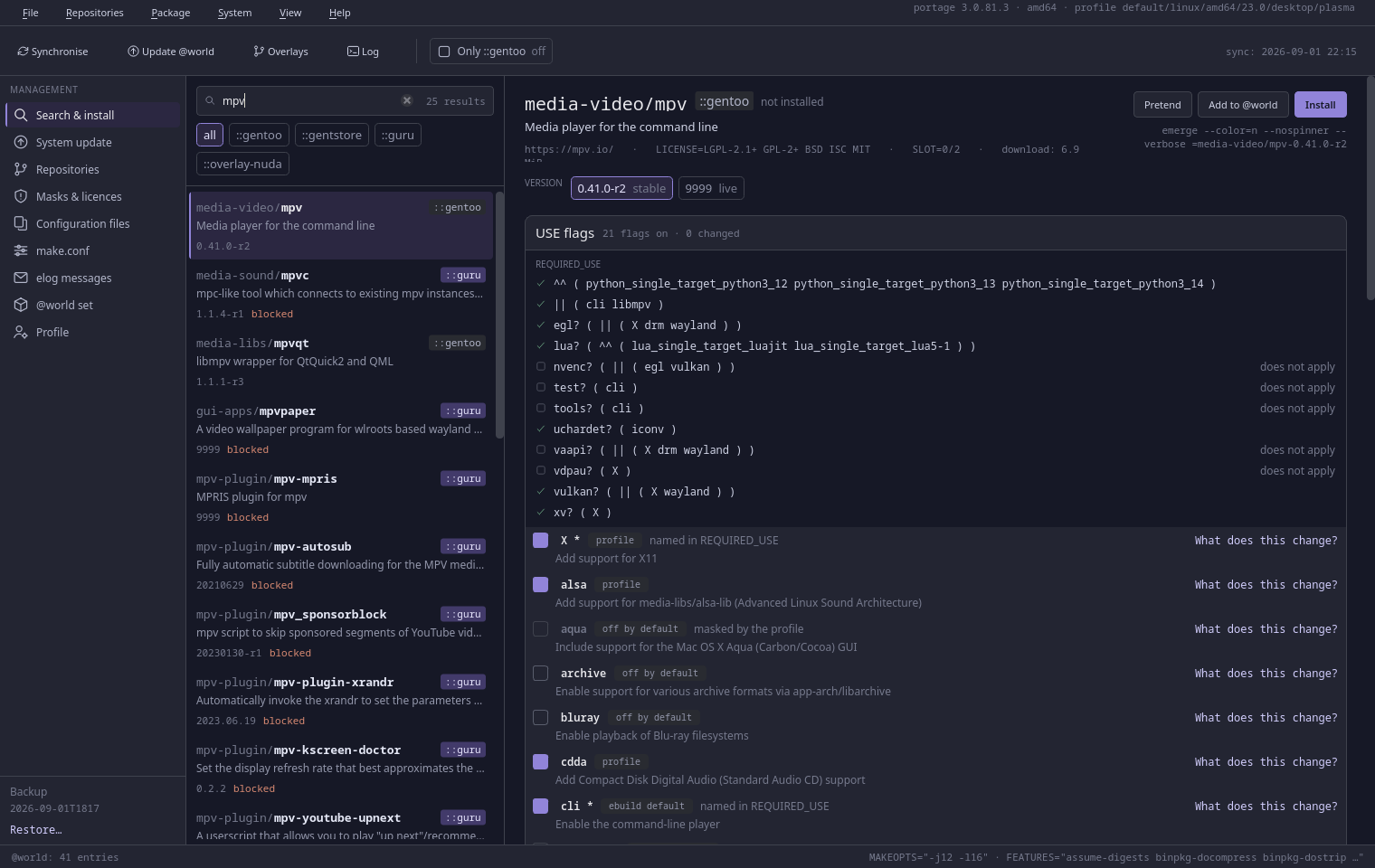
Search and install — results from four repositories, package details, versions with their keywords, the command under the buttons
Principles
Five rules the whole application stands on
Not slogans — each one has a specific consequence in the interface, visible on screen before anything is written.
Nothing happens quietly
Every change to /etc/portage is previewed before it is written, and afterwards the application shows the exact path of the file and the exact line it added. Every button that executes a command has a tooltip with the command in full.
We never overwrite your files
We append lines, or change one specific line; comments and the formatting of the rest of the file are left untouched.
The graphical process is not root
Everything that needs privileges goes through pkexec and a small, reviewable helper program.
The data comes from the portage API
Not from parsing ebuilds. The core/ layer is plain Python with no Qt — it can be queried from a terminal.
The chosen repository applies everywhere
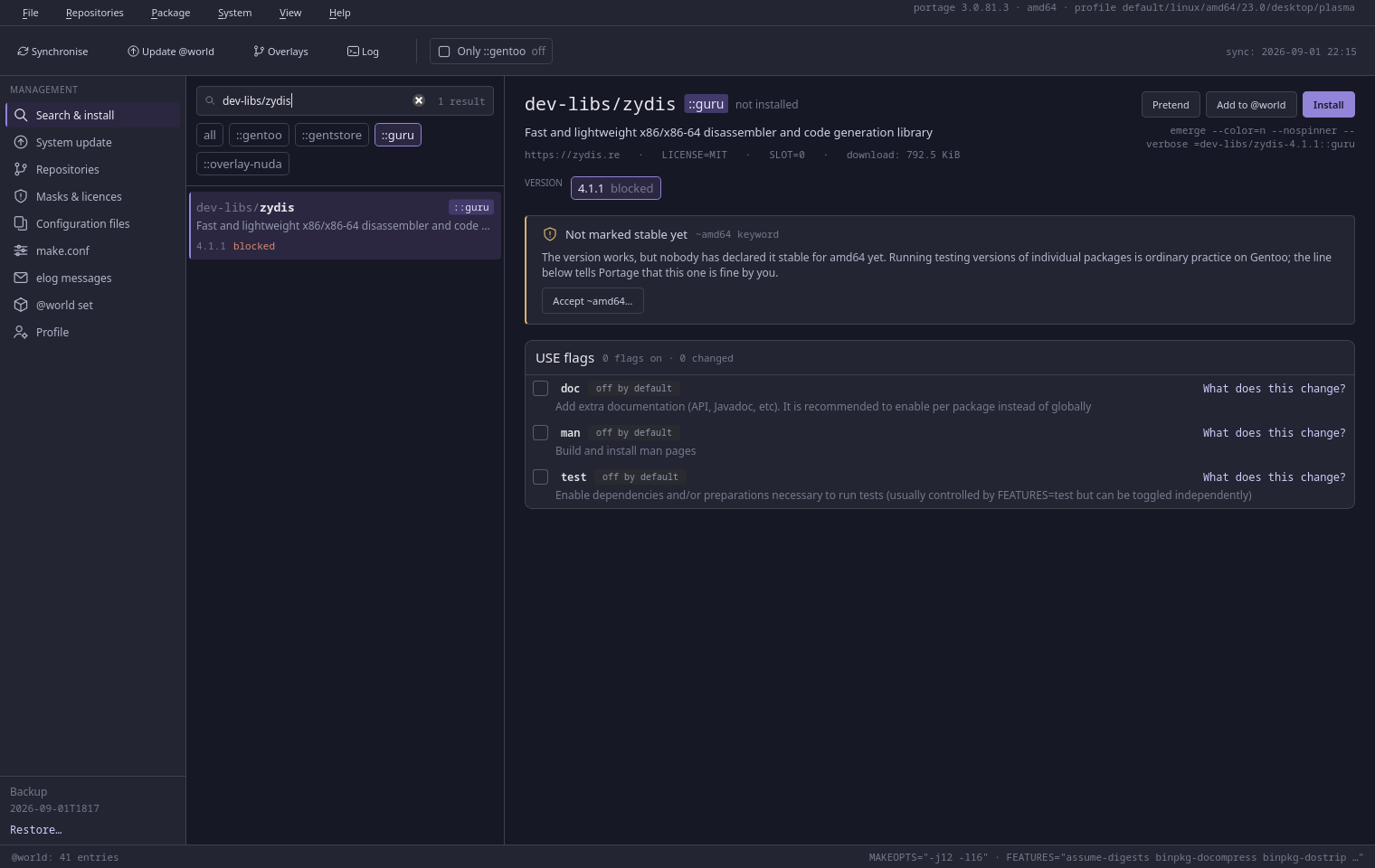
Clicking a ::repo badge narrows not only the list but also the detail panel, the versions, and the atom emerge is given. The same package in two overlays no longer blurs together.
Nine screens
The whole Portage cycle, screen by screen
01
Search and install
Searching by name, category and description. Repository filters, a list of versions, and the Pretend, Install and Uninstall actions — each shows the exact command before it runs it.
02
System update
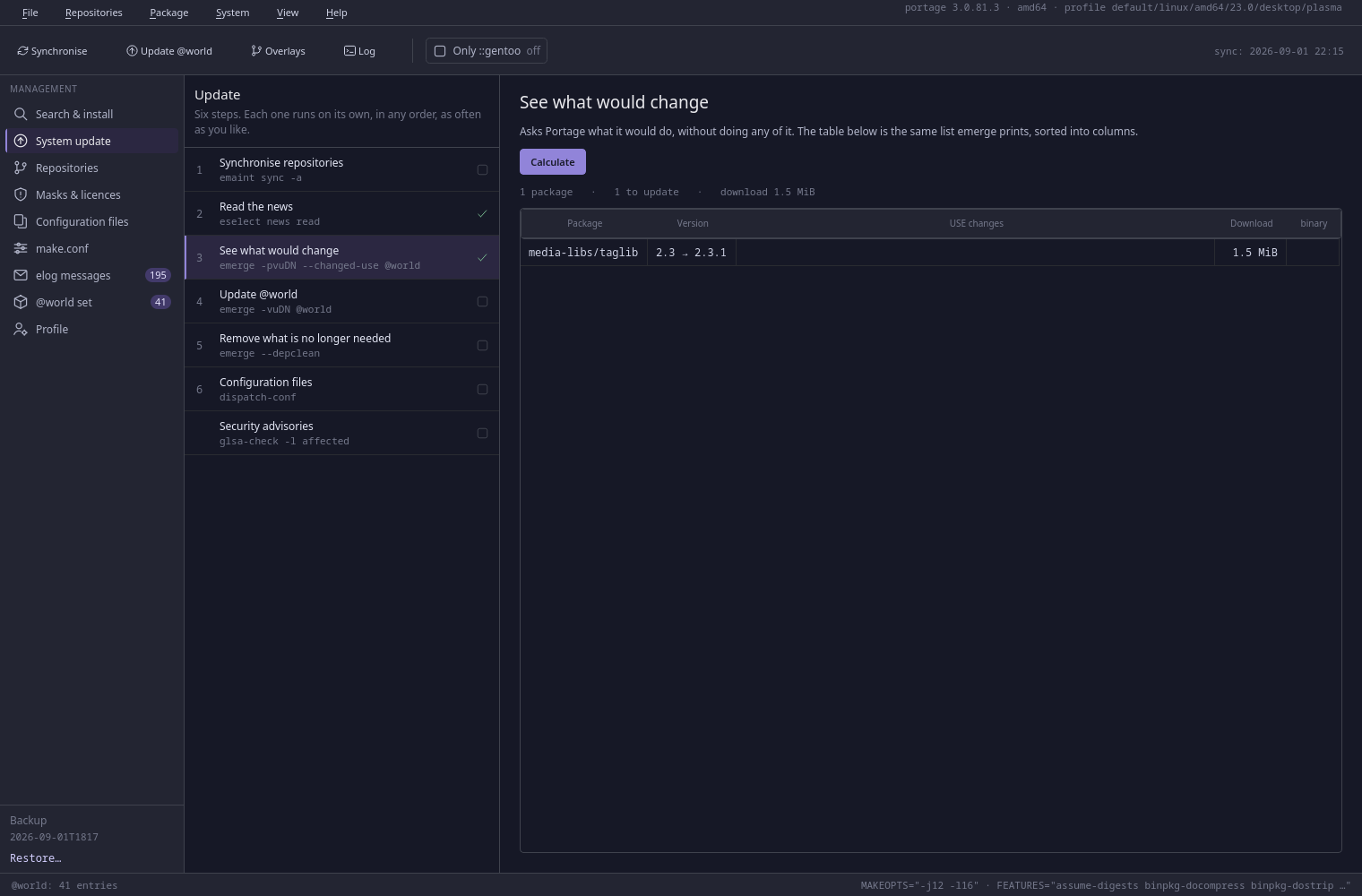
Six steps, each run separately: sync, Gentoo news, a preview in the form of a table, the update itself with a live log and an “Interrupt” button, --depclean, and the configuration files.
03
Repositories
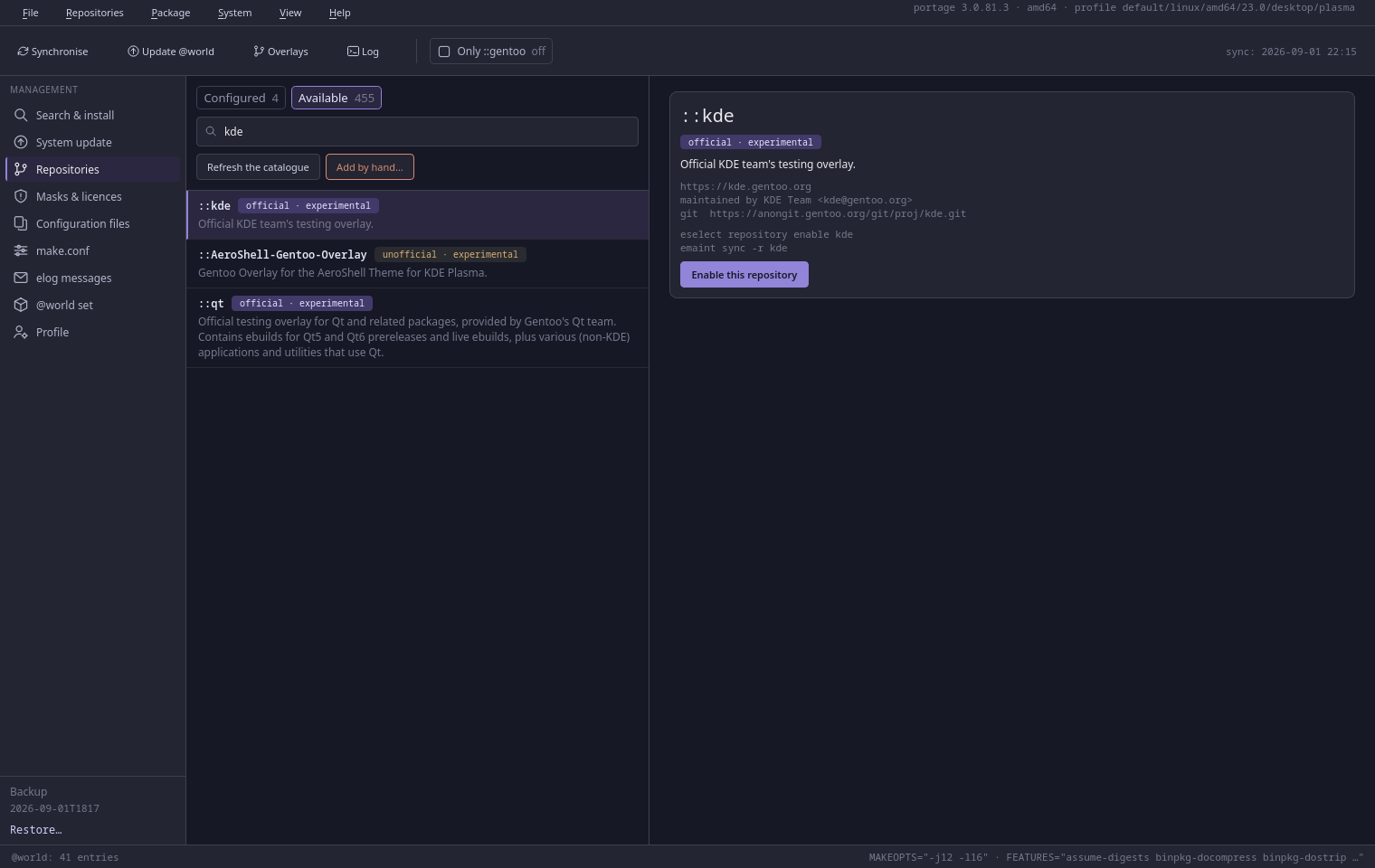
What you have configured, with the repos.conf section verbatim — and the catalogue of Gentoo repositories in the second tab. Enabling an overlay is one click.
04
Masks and licences
Why Portage refuses: for a mask, the maintainer's note verbatim along with the file it came from; for keywords, three cases told apart; for a licence, the full text to read.
05
Configuration files
The ._cfg files, with the package that brought each one and the number of changed lines. Next to it the difference, and under that three answers: keep mine, take the new one, merge by hand.
06
make.conf
Two values for each variable: the one written in the file and the one Portage actually uses. A change replaces one line. MAKEOPTS gets a suggestion computed from the core count and the amount of memory. EMERGE_DEFAULT_OPTS is editable here and applies to the emerge you run in a terminal — not to the ones this window runs, which ignore it so that the command shown before a run is the whole of what runs.
07
elog messages
What packages said about themselves during installation — the messages that scroll past in the terminal and vanish. Each entry has a class and a build phase, and the left edge of the row carries the colour of the most serious message inside it.
08
@world set
Side by side, two things that look identical once installed: the packages you asked for, and everything that is installed. Removing an entry uninstalls nothing.
09
Profile
The profiles from eselect, with the current one marked and, before a change, what follows from it said plainly: different default USE flags, different masks, a full rebuild.
⌘
Ctrl+1…9 switches screens, Ctrl+F jumps to the search box, Ctrl+L to the log.
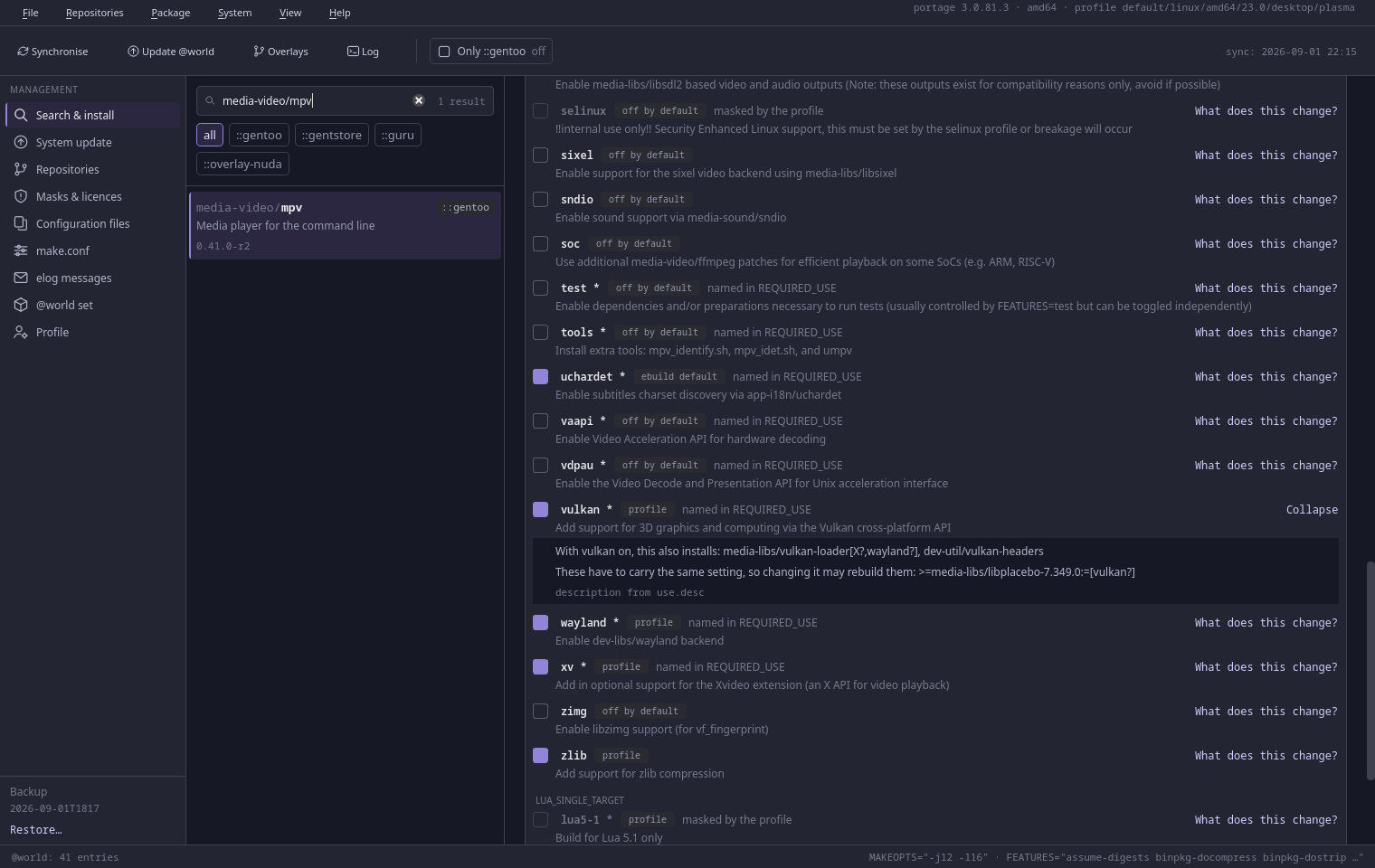
USE flags — where each flag's value comes from, and exactly what turning it on changes
A USE flag stops being a guess
For each flag you can see where its value comes from — the ebuild, the profile, make.conf, package.use — and the description from the repository.
Unfolded: exactly what turning it on changes, which packages will be pulled in and which ones will have the same flag forced on them. REQUIRED_USE conditions are checked as you go, and saving is blocked until the selection satisfies them.
At the bottom of the panel, the exact line that will go into the file, and the file it will be appended to — before anything happens.
One repository at a time — the same package lives in ::gentoo and in ::guru; the badge you pick decides which one the install comes from
System update — a preview table built from the output of emerge -pv
Adding one — who runs each repository, and the two commands enabling it would run
Privileges
GentStore never runs as root
Started with sudo it says so in a dialog and asks to be closed. Everything that needs privileges goes through pkexec and two small programs in /usr/libexec.
Both are single files that use nothing but the standard library, with no imports from the rest of the project — written so that they can be read end to end before being let anywhere near root. It is worth doing.
Every privileged step asks for your password. Both polkit actions are auth_admin, not the form that remembers an answer for a few minutes, so a six-step system update asks six times. What that form remembers is not this window may carry on but this user has authenticated for this action — and anything else running as you could use it.
Without the privileged half the application still runs — read-only: search, browsing flags, emerge --pretend. Every attempt to write then says what is missing.
The script registers /var/db/repos/gentstore as a synced overlay — later ebuilds arrive with an ordinary emerge --sync. It prints every file it writes and overwrites nobody else's. Reading it first is the version this project recommends — 200 lines, and it is about to run as root.
From the working directory — for working on the code
The .qm catalogues are not kept in the repository.
You get the tagged release, unless you say otherwise — the installer asks, and --stable and --live skip the question. The 9999 ebuild sorts above every release there will ever be, so choosing the release means the live one is deliberately left unaccepted.
Requirements
dev-lang/python ≥ 3.12
the runtime
sys-apps/portage
the portage module — package data
dev-python/pyqt6
the graphical interface
dev-qt/qttools[linguist]
lrelease — compiling the translations
app-eselect/eselect-repository
overlays and the repositories.xml catalogue
sys-auth/polkit
pkexec — raising privileges
Optional: app-portage/gentoolkit (GLSA scanning) and app-portage/cpuid2cpuflags. Their absence disables a single feature and is reported in the interface — it does not bring the application down.
The backend without the GUI
The core/ layer is plain Python with no Qt, so it can be queried from a terminal. Useful when a list in the window is empty and you need to know whether the problem is in the interface or in the data.
python -m gentstore.core.cli info
python -m gentstore.core.cli repos -v
python -m gentstore.core.cli search mpv
python -m gentstore.core.cli show media-video/mpv
python -m gentstore.core.cli show dev-libs/zydis --repo guru
python -m gentstore.core.cli world
Every command takes --json and --debug. It is a development tool — it speaks English only, because it is not part of the interface.
Where the project stands
Version 1.4.1
All nine screens work, and both halves have been exercised on a live system: the read-only side — search, USE flags, masks, repositories, the update preview, configuration files, make.conf, elog and @world — and the privileged one, which has written real package.use, package.license and package.accept_keywords entries through pkexec.
New in 1.4.0
Two ways the privileged half did more than the dialog said
write_file proved that its path was under repos.conf and then wrote whatever came with it — and Portage merges every file in that directory, so a section named [gentoo] did not add a repository, it replaced the one every package on the system comes from. cfg_apply's merge took its text from the request with nothing tying it to what the user had been shown, so any ._cfg file waiting after an update was a way to write chosen content beside it as root. Both are fixed; the content is checked now, not only the path.
The preview showed nothing while the line was written in full
QLabel guesses whether its text is HTML. An atom that opens with the less-than operator — an ordinary upper-bound atom, which emerge --autounmask prints — looks like an unclosed tag, so the panel that says *this is what will be written* rendered it as the empty string and wrote all of it anyway. The same guess drew package descriptions from an ebuild as markup, which made an image tag in one of them a network request from a program documented as making none.
One line from an ebuild could stop the window answering
Two expressions in the emerge output parser backtracked: 200,000 characters took 128 seconds, and an ebuild's pkg_pretend() runs during --pretend and may print anything. Both are linear now — a million characters take milliseconds — and output is capped at 16 KiB per line, which also stops the buffer growing for as long as a build with a progress bar runs.
Reinstall the privileged half after updating
sudo make install-system, or reinstall the package. The helper's protocol went from 2 to 3, because replace_line no longer compiles a regular expression out of the request — ^(a+)+$ is seven characters and never finishes, in a process running as root that you cannot signal. An older helper refuses every line replacement; the window notices and says so, but it is easier to know first.
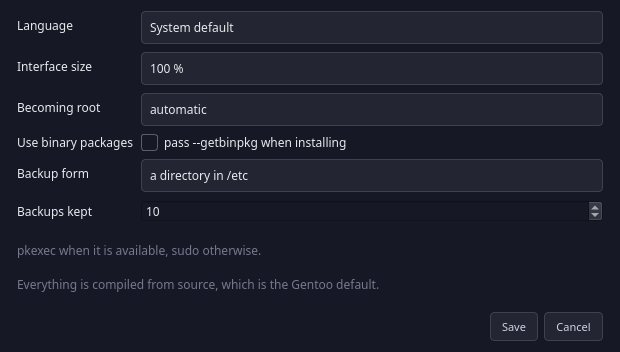
The language comes from the system settings; View → Language changes it without a restart. The interface scale — 100, 115 or 130% — is under View → Interface size, because the 12.5 px base font is small on purpose: the screens show a lot of data at once.
The settings also carry how the application becomes root, and how many copies of /etc/portage to keep.
Settings — language, interface size, how the application becomes root, and how many backups to keep
Install it and see what Portage was trying to tell you
The script stops short of installing anything and prints the command instead. You run it yourself.